MP / DLC Menu | Load Online maps into Story Mode | Cayo Perico, North Yankton, Diamond Casino + v3.1.1 - Enhanced + Legacy Support



74 602
287
74 602
287
MP Map Menu v3.1.1
By Pakked / FlyHigh
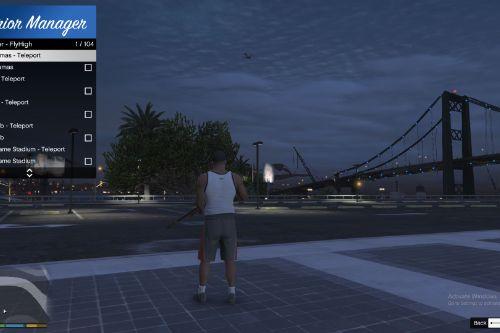
This mod adds a menu to GTA V which allows you to enable/disable GTA Online / Multiplayer DLC map content in Single Player.
It also includes quick teleports for access to:
- Diamond Casino
- Cayo Perico Island
- North Yankton / Prologue Map
Installation:
01. Install all requirements listed below.
02. Install the correct MPMenu build for your game version.
03. Drop either "MPMenu Legacy.dll" or "MPMenu Enhanced.dll" into your "scripts" folder.
04. Drop "MPMenu.ini" into your "scripts" folder.
05. Drop "LemonUI.SHVDN3.dll" into your "scripts" folder.
06. Start GTA V and press the configured menu key. Default is F5.
Important:
Do not place the MPMenu DLL in the GTA root folder. It must go inside the "scripts" folder.
Do not install both MPMenu Legacy.dll and MPMenu Enhanced.dll at the same time.
Only install the build made for your game version.
You do not need to rename the DLL to MPMenu.dll.
ScriptHookVDotNet loads DLLs from the scripts folder regardless of the file name.
Renaming a DLL does not change what it was built against.
For example, renaming the Enhanced DLL will not make it work on Legacy.
Prerequisites / Requirements:
ScriptHookV
http://www.dev-c.com/gtav/scripthookv/
Goes in the GTA V root folder.
ScriptHookVDotNet / SHVDNE
This mod is built for the ScriptHookVDotNet3 API.
Which version should you use
Legacy GTA V users:
- Use MPMenu Legacy.dll.
- Use normal ScriptHookVDotNet v3.
- Download: https://www.gta5-mods.com/tools/scripthookv-net
- Goes in the GTA V root folder.
- SHVDNE can also be used on Legacy as a drop-in replacement, but it is not required for Legacy.
Enhanced GTA V users:
- Use MPMenu Enhanced.dll.
- Use ScriptHookVDotNet Enhanced / SHVDNE.
- Download: https://github.com/Chiheb-Bacha/ScriptHookVDotNetEnhanced/releases
- Goes in the GTA V root folder.
- SHVDNE is required for GTA V Enhanced because normal ScriptHookVDotNet only supports Legacy GTA V.
LemonUI for ScriptHookVDotNet3
https://github.com/LemonUIbyLemon/LemonUI
LemonUI.SHVDN3.dll goes in the "scripts" folder.
Make sure you use LemonUI.SHVDN3.dll, not the SHVDN2 version.
No Longer Required:
NativeUI is no longer required in v3.
This mod now uses LemonUI instead of NativeUI.
Default Keybinds:
Open Menu = F5
The keybinds can be changed in "MPMenu.ini".
MPMenu.ini Example:
[Hotkeys]
OpenMenu=F5
Optional direct hotkeys. Use None to disable.
ToggleMPMaps=None
EnableMPMaps=None
DisableMPMaps=None
TeleportCasino=None
TeleportCayoPerico=None
TeleportNorthYankton=None
[Options]
Legacy support from older versions. Hotkeys/OpenMenu is preferred.
Open Menu=F5
Menu Options:
Enable DLC/MP Maps
- Enables GTA Online / Multiplayer DLC map content in Story Mode.
Disable DLC/MP Maps
- Returns the world to the Story Mode map state.
- If the player is on a DLC/special map, the player is moved to the closest safe mainland location first.
Map Teleports:
Diamond Casino
- Teleports the player to the Diamond Casino.
- If returning from Cayo Perico or North Yankton, the mod safely reloads San Andreas first.
Cayo Perico
- Loads Cayo Perico.
- Enables the Cayo minimap/pause-map mode.
- Reveals the Cayo main map instead of leaving it undiscovered.
- Ensures North Yankton is unloaded first to prevent map overlap.
North Yankton
- Loads the North Yankton / Prologue map.
- Enables the North Yankton/prologue minimap mode.
- Ensures Cayo Perico is unloaded first to prevent map overlap.
Notes:
This mod changes the active MP/DLC map state while in Single Player.
Cayo Perico and North Yankton use overlapping southeast world-space, so the mod keeps them exclusive.
This means only one of those special maps is loaded at a time.
The Cayo Perico map reveal is a runtime minimap/pause-map visibility toggle.
It should not permanently edit your save file discovery data.
Compatibility:
This mod should work alongside most other script mods.
If another mod is also forcing MP map state, Cayo Perico, North Yankton, or minimap modes, the last mod to apply its state may override the other.
Troubleshooting:
[ERROR] Blocking script! Script MPMenuLemonUI (file name: MPMenu.dll) was terminated because it caused the game to freeze too long.
To Fix this you can edit your ScriptHookVDotNet.ini and change ScriptTimeoutThreshold to around 15000.
If the menu does not open:
- Make sure the correct MPMenu DLL is inside the "scripts" folder.
- Make sure MPMenu.ini is inside the "scripts" folder.
- Make sure ScriptHookV is installed in the GTA V root folder.
- Make sure the correct ScriptHookVDotNet / SHVDNE version is installed for your game version.
- Make sure LemonUI.SHVDN3.dll is inside the "scripts" folder.
- Check that OpenMenu is set to a valid key in MPMenu.ini.
If you are on GTA V Legacy:
- Use MPMenu Legacy.dll.
- Normal ScriptHookVDotNet v3 is fine.
- SHVDNE is optional for Legacy.
- Do not use MPMenu Enhanced.dll unless your Legacy install is also using the matching SHVDNE / ScriptHookVDotNet3 version.
If you are on GTA V Enhanced:
- Use MPMenu Enhanced.dll.
- Use SHVDNE.
- Normal ScriptHookVDotNet is not supported for Enhanced.
If the game says it cannot load ScriptHookVDotNet3, Version=3.9.0.0:
- You are likely using the Enhanced build on a Legacy SHVDN install.
- Install MPMenu Legacy.dll, or update to a matching ScriptHookVDotNet / SHVDNE version.
- Do not fix this by only renaming the DLL.
If Cayo Perico or North Yankton appears unloaded:
- Try teleporting again after a few seconds.
- Avoid rapidly switching maps back-to-back.
- Make sure no other map loader is fighting the mod.
Changelog:
3.1
Changes:
- Added separate Legacy and Enhanced builds.
- Legacy users should use MPMenu Legacy.dll.
- Enhanced users should use MPMenu Enhanced.dll.
- Users do not need to rename the DLL to MPMenu.dll.
- Added clearer install instructions for ScriptHookVDotNet and SHVDNE version differences.
- Added troubleshooting for ScriptHookVDotNet3 version mismatch errors.
3.0
Changes:
- Rebuilt for ScriptHookVDotNet3.
- Replaced NativeUI with LemonUI.
- Added LemonUI menu to replace outdated NativeUI.
- Renamed Enable DLC/MP Maps and Disable DLC/MP Maps options.
- Added quick teleport submenu:
- Added Diamond Casino teleport.
- Added Cayo Perico teleport.
- Added North Yankton teleport.
- Added Cayo Perico minimap/pause-map support.
- Added Cayo Perico main map visibility/fog-of-war runtime toggle.
- Added North Yankton/prologue minimap mode.
- Added exclusive switching so Cayo Perico and North Yankton do not load at the same time.
- Added Loading text transition for indication of responsiveness.
- Added improved streaming/focus/collision handling before and after teleports.
- Added safe mainland teleporting when disabling MP maps from DLC/special map areas.
- Added casino exterior/door loading fix.
- Added optional direct hotkeys for toggling MP maps and teleporting.
Bug Fixes:
- Fixed missing SHVDN3 Hash enum by using local native hashes instead.
- Fixed Cayo Perico loading issue where the player could fall into water before the island streamed.
- Fixed Cayo Perico and North Yankton overlapping in the same southeast map space.
- Fixed casino teleport unnecessarily loading when already in Los Santos.
- Fixed missing Diamond Casino door/exterior streaming.
Known Bugs:
- North Yankton is a prologue map and may not behave exactly like normal freemode map content.
- If another map loader mod is active, map/minimap state may be overridden.
- Very fast repeated switching may still cause GTA streaming delays or crashes.
2.0
Features:
- New UI menu.
- Custom key bindings.
Bug Fixes:
- Fixed bug where the game could crash while initializing the mod.
- Fixed bug where the mod would disable MP maps in special cases.
1.0
- Initial release.
By Pakked / FlyHigh
This mod adds a menu to GTA V which allows you to enable/disable GTA Online / Multiplayer DLC map content in Single Player.
It also includes quick teleports for access to:
- Diamond Casino
- Cayo Perico Island
- North Yankton / Prologue Map
Installation:
01. Install all requirements listed below.
02. Install the correct MPMenu build for your game version.
03. Drop either "MPMenu Legacy.dll" or "MPMenu Enhanced.dll" into your "scripts" folder.
04. Drop "MPMenu.ini" into your "scripts" folder.
05. Drop "LemonUI.SHVDN3.dll" into your "scripts" folder.
06. Start GTA V and press the configured menu key. Default is F5.
Important:
Do not place the MPMenu DLL in the GTA root folder. It must go inside the "scripts" folder.
Do not install both MPMenu Legacy.dll and MPMenu Enhanced.dll at the same time.
Only install the build made for your game version.
You do not need to rename the DLL to MPMenu.dll.
ScriptHookVDotNet loads DLLs from the scripts folder regardless of the file name.
Renaming a DLL does not change what it was built against.
For example, renaming the Enhanced DLL will not make it work on Legacy.
Prerequisites / Requirements:
ScriptHookV
http://www.dev-c.com/gtav/scripthookv/
Goes in the GTA V root folder.
ScriptHookVDotNet / SHVDNE
This mod is built for the ScriptHookVDotNet3 API.
Which version should you use
Legacy GTA V users:
- Use MPMenu Legacy.dll.
- Use normal ScriptHookVDotNet v3.
- Download: https://www.gta5-mods.com/tools/scripthookv-net
- Goes in the GTA V root folder.
- SHVDNE can also be used on Legacy as a drop-in replacement, but it is not required for Legacy.
Enhanced GTA V users:
- Use MPMenu Enhanced.dll.
- Use ScriptHookVDotNet Enhanced / SHVDNE.
- Download: https://github.com/Chiheb-Bacha/ScriptHookVDotNetEnhanced/releases
- Goes in the GTA V root folder.
- SHVDNE is required for GTA V Enhanced because normal ScriptHookVDotNet only supports Legacy GTA V.
LemonUI for ScriptHookVDotNet3
https://github.com/LemonUIbyLemon/LemonUI
LemonUI.SHVDN3.dll goes in the "scripts" folder.
Make sure you use LemonUI.SHVDN3.dll, not the SHVDN2 version.
No Longer Required:
NativeUI is no longer required in v3.
This mod now uses LemonUI instead of NativeUI.
Default Keybinds:
Open Menu = F5
The keybinds can be changed in "MPMenu.ini".
MPMenu.ini Example:
[Hotkeys]
OpenMenu=F5
Optional direct hotkeys. Use None to disable.
ToggleMPMaps=None
EnableMPMaps=None
DisableMPMaps=None
TeleportCasino=None
TeleportCayoPerico=None
TeleportNorthYankton=None
[Options]
Legacy support from older versions. Hotkeys/OpenMenu is preferred.
Open Menu=F5
Menu Options:
Enable DLC/MP Maps
- Enables GTA Online / Multiplayer DLC map content in Story Mode.
Disable DLC/MP Maps
- Returns the world to the Story Mode map state.
- If the player is on a DLC/special map, the player is moved to the closest safe mainland location first.
Map Teleports:
Diamond Casino
- Teleports the player to the Diamond Casino.
- If returning from Cayo Perico or North Yankton, the mod safely reloads San Andreas first.
Cayo Perico
- Loads Cayo Perico.
- Enables the Cayo minimap/pause-map mode.
- Reveals the Cayo main map instead of leaving it undiscovered.
- Ensures North Yankton is unloaded first to prevent map overlap.
North Yankton
- Loads the North Yankton / Prologue map.
- Enables the North Yankton/prologue minimap mode.
- Ensures Cayo Perico is unloaded first to prevent map overlap.
Notes:
This mod changes the active MP/DLC map state while in Single Player.
Cayo Perico and North Yankton use overlapping southeast world-space, so the mod keeps them exclusive.
This means only one of those special maps is loaded at a time.
The Cayo Perico map reveal is a runtime minimap/pause-map visibility toggle.
It should not permanently edit your save file discovery data.
Compatibility:
This mod should work alongside most other script mods.
If another mod is also forcing MP map state, Cayo Perico, North Yankton, or minimap modes, the last mod to apply its state may override the other.
Troubleshooting:
[ERROR] Blocking script! Script MPMenuLemonUI (file name: MPMenu.dll) was terminated because it caused the game to freeze too long.
To Fix this you can edit your ScriptHookVDotNet.ini and change ScriptTimeoutThreshold to around 15000.
If the menu does not open:
- Make sure the correct MPMenu DLL is inside the "scripts" folder.
- Make sure MPMenu.ini is inside the "scripts" folder.
- Make sure ScriptHookV is installed in the GTA V root folder.
- Make sure the correct ScriptHookVDotNet / SHVDNE version is installed for your game version.
- Make sure LemonUI.SHVDN3.dll is inside the "scripts" folder.
- Check that OpenMenu is set to a valid key in MPMenu.ini.
If you are on GTA V Legacy:
- Use MPMenu Legacy.dll.
- Normal ScriptHookVDotNet v3 is fine.
- SHVDNE is optional for Legacy.
- Do not use MPMenu Enhanced.dll unless your Legacy install is also using the matching SHVDNE / ScriptHookVDotNet3 version.
If you are on GTA V Enhanced:
- Use MPMenu Enhanced.dll.
- Use SHVDNE.
- Normal ScriptHookVDotNet is not supported for Enhanced.
If the game says it cannot load ScriptHookVDotNet3, Version=3.9.0.0:
- You are likely using the Enhanced build on a Legacy SHVDN install.
- Install MPMenu Legacy.dll, or update to a matching ScriptHookVDotNet / SHVDNE version.
- Do not fix this by only renaming the DLL.
If Cayo Perico or North Yankton appears unloaded:
- Try teleporting again after a few seconds.
- Avoid rapidly switching maps back-to-back.
- Make sure no other map loader is fighting the mod.
Changelog:
3.1
Changes:
- Added separate Legacy and Enhanced builds.
- Legacy users should use MPMenu Legacy.dll.
- Enhanced users should use MPMenu Enhanced.dll.
- Users do not need to rename the DLL to MPMenu.dll.
- Added clearer install instructions for ScriptHookVDotNet and SHVDNE version differences.
- Added troubleshooting for ScriptHookVDotNet3 version mismatch errors.
3.0
Changes:
- Rebuilt for ScriptHookVDotNet3.
- Replaced NativeUI with LemonUI.
- Added LemonUI menu to replace outdated NativeUI.
- Renamed Enable DLC/MP Maps and Disable DLC/MP Maps options.
- Added quick teleport submenu:
- Added Diamond Casino teleport.
- Added Cayo Perico teleport.
- Added North Yankton teleport.
- Added Cayo Perico minimap/pause-map support.
- Added Cayo Perico main map visibility/fog-of-war runtime toggle.
- Added North Yankton/prologue minimap mode.
- Added exclusive switching so Cayo Perico and North Yankton do not load at the same time.
- Added Loading text transition for indication of responsiveness.
- Added improved streaming/focus/collision handling before and after teleports.
- Added safe mainland teleporting when disabling MP maps from DLC/special map areas.
- Added casino exterior/door loading fix.
- Added optional direct hotkeys for toggling MP maps and teleporting.
Bug Fixes:
- Fixed missing SHVDN3 Hash enum by using local native hashes instead.
- Fixed Cayo Perico loading issue where the player could fall into water before the island streamed.
- Fixed Cayo Perico and North Yankton overlapping in the same southeast map space.
- Fixed casino teleport unnecessarily loading when already in Los Santos.
- Fixed missing Diamond Casino door/exterior streaming.
Known Bugs:
- North Yankton is a prologue map and may not behave exactly like normal freemode map content.
- If another map loader mod is active, map/minimap state may be overridden.
- Very fast repeated switching may still cause GTA streaming delays or crashes.
2.0
Features:
- New UI menu.
- Custom key bindings.
Bug Fixes:
- Fixed bug where the game could crash while initializing the mod.
- Fixed bug where the mod would disable MP maps in special cases.
1.0
- Initial release.
Dodano: 19 października 2020
Ostatnia aktualizacja: 19 czerwca 2026
Last Downloaded: 11 minut temu
140 Komentarzy
More mods by FlyHigh / Pakked:
MP Map Menu v3.1.1
By Pakked / FlyHigh
This mod adds a menu to GTA V which allows you to enable/disable GTA Online / Multiplayer DLC map content in Single Player.
It also includes quick teleports for access to:
- Diamond Casino
- Cayo Perico Island
- North Yankton / Prologue Map
Installation:
01. Install all requirements listed below.
02. Install the correct MPMenu build for your game version.
03. Drop either "MPMenu Legacy.dll" or "MPMenu Enhanced.dll" into your "scripts" folder.
04. Drop "MPMenu.ini" into your "scripts" folder.
05. Drop "LemonUI.SHVDN3.dll" into your "scripts" folder.
06. Start GTA V and press the configured menu key. Default is F5.
Important:
Do not place the MPMenu DLL in the GTA root folder. It must go inside the "scripts" folder.
Do not install both MPMenu Legacy.dll and MPMenu Enhanced.dll at the same time.
Only install the build made for your game version.
You do not need to rename the DLL to MPMenu.dll.
ScriptHookVDotNet loads DLLs from the scripts folder regardless of the file name.
Renaming a DLL does not change what it was built against.
For example, renaming the Enhanced DLL will not make it work on Legacy.
Prerequisites / Requirements:
ScriptHookV
http://www.dev-c.com/gtav/scripthookv/
Goes in the GTA V root folder.
ScriptHookVDotNet / SHVDNE
This mod is built for the ScriptHookVDotNet3 API.
Which version should you use
Legacy GTA V users:
- Use MPMenu Legacy.dll.
- Use normal ScriptHookVDotNet v3.
- Download: https://www.gta5-mods.com/tools/scripthookv-net
- Goes in the GTA V root folder.
- SHVDNE can also be used on Legacy as a drop-in replacement, but it is not required for Legacy.
Enhanced GTA V users:
- Use MPMenu Enhanced.dll.
- Use ScriptHookVDotNet Enhanced / SHVDNE.
- Download: https://github.com/Chiheb-Bacha/ScriptHookVDotNetEnhanced/releases
- Goes in the GTA V root folder.
- SHVDNE is required for GTA V Enhanced because normal ScriptHookVDotNet only supports Legacy GTA V.
LemonUI for ScriptHookVDotNet3
https://github.com/LemonUIbyLemon/LemonUI
LemonUI.SHVDN3.dll goes in the "scripts" folder.
Make sure you use LemonUI.SHVDN3.dll, not the SHVDN2 version.
No Longer Required:
NativeUI is no longer required in v3.
This mod now uses LemonUI instead of NativeUI.
Default Keybinds:
Open Menu = F5
The keybinds can be changed in "MPMenu.ini".
MPMenu.ini Example:
[Hotkeys]
OpenMenu=F5
Optional direct hotkeys. Use None to disable.
ToggleMPMaps=None
EnableMPMaps=None
DisableMPMaps=None
TeleportCasino=None
TeleportCayoPerico=None
TeleportNorthYankton=None
[Options]
Legacy support from older versions. Hotkeys/OpenMenu is preferred.
Open Menu=F5
Menu Options:
Enable DLC/MP Maps
- Enables GTA Online / Multiplayer DLC map content in Story Mode.
Disable DLC/MP Maps
- Returns the world to the Story Mode map state.
- If the player is on a DLC/special map, the player is moved to the closest safe mainland location first.
Map Teleports:
Diamond Casino
- Teleports the player to the Diamond Casino.
- If returning from Cayo Perico or North Yankton, the mod safely reloads San Andreas first.
Cayo Perico
- Loads Cayo Perico.
- Enables the Cayo minimap/pause-map mode.
- Reveals the Cayo main map instead of leaving it undiscovered.
- Ensures North Yankton is unloaded first to prevent map overlap.
North Yankton
- Loads the North Yankton / Prologue map.
- Enables the North Yankton/prologue minimap mode.
- Ensures Cayo Perico is unloaded first to prevent map overlap.
Notes:
This mod changes the active MP/DLC map state while in Single Player.
Cayo Perico and North Yankton use overlapping southeast world-space, so the mod keeps them exclusive.
This means only one of those special maps is loaded at a time.
The Cayo Perico map reveal is a runtime minimap/pause-map visibility toggle.
It should not permanently edit your save file discovery data.
Compatibility:
This mod should work alongside most other script mods.
If another mod is also forcing MP map state, Cayo Perico, North Yankton, or minimap modes, the last mod to apply its state may override the other.
Troubleshooting:
[ERROR] Blocking script! Script MPMenuLemonUI (file name: MPMenu.dll) was terminated because it caused the game to freeze too long.
To Fix this you can edit your ScriptHookVDotNet.ini and change ScriptTimeoutThreshold to around 15000.
If the menu does not open:
- Make sure the correct MPMenu DLL is inside the "scripts" folder.
- Make sure MPMenu.ini is inside the "scripts" folder.
- Make sure ScriptHookV is installed in the GTA V root folder.
- Make sure the correct ScriptHookVDotNet / SHVDNE version is installed for your game version.
- Make sure LemonUI.SHVDN3.dll is inside the "scripts" folder.
- Check that OpenMenu is set to a valid key in MPMenu.ini.
If you are on GTA V Legacy:
- Use MPMenu Legacy.dll.
- Normal ScriptHookVDotNet v3 is fine.
- SHVDNE is optional for Legacy.
- Do not use MPMenu Enhanced.dll unless your Legacy install is also using the matching SHVDNE / ScriptHookVDotNet3 version.
If you are on GTA V Enhanced:
- Use MPMenu Enhanced.dll.
- Use SHVDNE.
- Normal ScriptHookVDotNet is not supported for Enhanced.
If the game says it cannot load ScriptHookVDotNet3, Version=3.9.0.0:
- You are likely using the Enhanced build on a Legacy SHVDN install.
- Install MPMenu Legacy.dll, or update to a matching ScriptHookVDotNet / SHVDNE version.
- Do not fix this by only renaming the DLL.
If Cayo Perico or North Yankton appears unloaded:
- Try teleporting again after a few seconds.
- Avoid rapidly switching maps back-to-back.
- Make sure no other map loader is fighting the mod.
Changelog:
3.1
Changes:
- Added separate Legacy and Enhanced builds.
- Legacy users should use MPMenu Legacy.dll.
- Enhanced users should use MPMenu Enhanced.dll.
- Users do not need to rename the DLL to MPMenu.dll.
- Added clearer install instructions for ScriptHookVDotNet and SHVDNE version differences.
- Added troubleshooting for ScriptHookVDotNet3 version mismatch errors.
3.0
Changes:
- Rebuilt for ScriptHookVDotNet3.
- Replaced NativeUI with LemonUI.
- Added LemonUI menu to replace outdated NativeUI.
- Renamed Enable DLC/MP Maps and Disable DLC/MP Maps options.
- Added quick teleport submenu:
- Added Diamond Casino teleport.
- Added Cayo Perico teleport.
- Added North Yankton teleport.
- Added Cayo Perico minimap/pause-map support.
- Added Cayo Perico main map visibility/fog-of-war runtime toggle.
- Added North Yankton/prologue minimap mode.
- Added exclusive switching so Cayo Perico and North Yankton do not load at the same time.
- Added Loading text transition for indication of responsiveness.
- Added improved streaming/focus/collision handling before and after teleports.
- Added safe mainland teleporting when disabling MP maps from DLC/special map areas.
- Added casino exterior/door loading fix.
- Added optional direct hotkeys for toggling MP maps and teleporting.
Bug Fixes:
- Fixed missing SHVDN3 Hash enum by using local native hashes instead.
- Fixed Cayo Perico loading issue where the player could fall into water before the island streamed.
- Fixed Cayo Perico and North Yankton overlapping in the same southeast map space.
- Fixed casino teleport unnecessarily loading when already in Los Santos.
- Fixed missing Diamond Casino door/exterior streaming.
Known Bugs:
- North Yankton is a prologue map and may not behave exactly like normal freemode map content.
- If another map loader mod is active, map/minimap state may be overridden.
- Very fast repeated switching may still cause GTA streaming delays or crashes.
2.0
Features:
- New UI menu.
- Custom key bindings.
Bug Fixes:
- Fixed bug where the game could crash while initializing the mod.
- Fixed bug where the mod would disable MP maps in special cases.
1.0
- Initial release.
By Pakked / FlyHigh
This mod adds a menu to GTA V which allows you to enable/disable GTA Online / Multiplayer DLC map content in Single Player.
It also includes quick teleports for access to:
- Diamond Casino
- Cayo Perico Island
- North Yankton / Prologue Map
Installation:
01. Install all requirements listed below.
02. Install the correct MPMenu build for your game version.
03. Drop either "MPMenu Legacy.dll" or "MPMenu Enhanced.dll" into your "scripts" folder.
04. Drop "MPMenu.ini" into your "scripts" folder.
05. Drop "LemonUI.SHVDN3.dll" into your "scripts" folder.
06. Start GTA V and press the configured menu key. Default is F5.
Important:
Do not place the MPMenu DLL in the GTA root folder. It must go inside the "scripts" folder.
Do not install both MPMenu Legacy.dll and MPMenu Enhanced.dll at the same time.
Only install the build made for your game version.
You do not need to rename the DLL to MPMenu.dll.
ScriptHookVDotNet loads DLLs from the scripts folder regardless of the file name.
Renaming a DLL does not change what it was built against.
For example, renaming the Enhanced DLL will not make it work on Legacy.
Prerequisites / Requirements:
ScriptHookV
http://www.dev-c.com/gtav/scripthookv/
Goes in the GTA V root folder.
ScriptHookVDotNet / SHVDNE
This mod is built for the ScriptHookVDotNet3 API.
Which version should you use
Legacy GTA V users:
- Use MPMenu Legacy.dll.
- Use normal ScriptHookVDotNet v3.
- Download: https://www.gta5-mods.com/tools/scripthookv-net
- Goes in the GTA V root folder.
- SHVDNE can also be used on Legacy as a drop-in replacement, but it is not required for Legacy.
Enhanced GTA V users:
- Use MPMenu Enhanced.dll.
- Use ScriptHookVDotNet Enhanced / SHVDNE.
- Download: https://github.com/Chiheb-Bacha/ScriptHookVDotNetEnhanced/releases
- Goes in the GTA V root folder.
- SHVDNE is required for GTA V Enhanced because normal ScriptHookVDotNet only supports Legacy GTA V.
LemonUI for ScriptHookVDotNet3
https://github.com/LemonUIbyLemon/LemonUI
LemonUI.SHVDN3.dll goes in the "scripts" folder.
Make sure you use LemonUI.SHVDN3.dll, not the SHVDN2 version.
No Longer Required:
NativeUI is no longer required in v3.
This mod now uses LemonUI instead of NativeUI.
Default Keybinds:
Open Menu = F5
The keybinds can be changed in "MPMenu.ini".
MPMenu.ini Example:
[Hotkeys]
OpenMenu=F5
Optional direct hotkeys. Use None to disable.
ToggleMPMaps=None
EnableMPMaps=None
DisableMPMaps=None
TeleportCasino=None
TeleportCayoPerico=None
TeleportNorthYankton=None
[Options]
Legacy support from older versions. Hotkeys/OpenMenu is preferred.
Open Menu=F5
Menu Options:
Enable DLC/MP Maps
- Enables GTA Online / Multiplayer DLC map content in Story Mode.
Disable DLC/MP Maps
- Returns the world to the Story Mode map state.
- If the player is on a DLC/special map, the player is moved to the closest safe mainland location first.
Map Teleports:
Diamond Casino
- Teleports the player to the Diamond Casino.
- If returning from Cayo Perico or North Yankton, the mod safely reloads San Andreas first.
Cayo Perico
- Loads Cayo Perico.
- Enables the Cayo minimap/pause-map mode.
- Reveals the Cayo main map instead of leaving it undiscovered.
- Ensures North Yankton is unloaded first to prevent map overlap.
North Yankton
- Loads the North Yankton / Prologue map.
- Enables the North Yankton/prologue minimap mode.
- Ensures Cayo Perico is unloaded first to prevent map overlap.
Notes:
This mod changes the active MP/DLC map state while in Single Player.
Cayo Perico and North Yankton use overlapping southeast world-space, so the mod keeps them exclusive.
This means only one of those special maps is loaded at a time.
The Cayo Perico map reveal is a runtime minimap/pause-map visibility toggle.
It should not permanently edit your save file discovery data.
Compatibility:
This mod should work alongside most other script mods.
If another mod is also forcing MP map state, Cayo Perico, North Yankton, or minimap modes, the last mod to apply its state may override the other.
Troubleshooting:
[ERROR] Blocking script! Script MPMenuLemonUI (file name: MPMenu.dll) was terminated because it caused the game to freeze too long.
To Fix this you can edit your ScriptHookVDotNet.ini and change ScriptTimeoutThreshold to around 15000.
If the menu does not open:
- Make sure the correct MPMenu DLL is inside the "scripts" folder.
- Make sure MPMenu.ini is inside the "scripts" folder.
- Make sure ScriptHookV is installed in the GTA V root folder.
- Make sure the correct ScriptHookVDotNet / SHVDNE version is installed for your game version.
- Make sure LemonUI.SHVDN3.dll is inside the "scripts" folder.
- Check that OpenMenu is set to a valid key in MPMenu.ini.
If you are on GTA V Legacy:
- Use MPMenu Legacy.dll.
- Normal ScriptHookVDotNet v3 is fine.
- SHVDNE is optional for Legacy.
- Do not use MPMenu Enhanced.dll unless your Legacy install is also using the matching SHVDNE / ScriptHookVDotNet3 version.
If you are on GTA V Enhanced:
- Use MPMenu Enhanced.dll.
- Use SHVDNE.
- Normal ScriptHookVDotNet is not supported for Enhanced.
If the game says it cannot load ScriptHookVDotNet3, Version=3.9.0.0:
- You are likely using the Enhanced build on a Legacy SHVDN install.
- Install MPMenu Legacy.dll, or update to a matching ScriptHookVDotNet / SHVDNE version.
- Do not fix this by only renaming the DLL.
If Cayo Perico or North Yankton appears unloaded:
- Try teleporting again after a few seconds.
- Avoid rapidly switching maps back-to-back.
- Make sure no other map loader is fighting the mod.
Changelog:
3.1
Changes:
- Added separate Legacy and Enhanced builds.
- Legacy users should use MPMenu Legacy.dll.
- Enhanced users should use MPMenu Enhanced.dll.
- Users do not need to rename the DLL to MPMenu.dll.
- Added clearer install instructions for ScriptHookVDotNet and SHVDNE version differences.
- Added troubleshooting for ScriptHookVDotNet3 version mismatch errors.
3.0
Changes:
- Rebuilt for ScriptHookVDotNet3.
- Replaced NativeUI with LemonUI.
- Added LemonUI menu to replace outdated NativeUI.
- Renamed Enable DLC/MP Maps and Disable DLC/MP Maps options.
- Added quick teleport submenu:
- Added Diamond Casino teleport.
- Added Cayo Perico teleport.
- Added North Yankton teleport.
- Added Cayo Perico minimap/pause-map support.
- Added Cayo Perico main map visibility/fog-of-war runtime toggle.
- Added North Yankton/prologue minimap mode.
- Added exclusive switching so Cayo Perico and North Yankton do not load at the same time.
- Added Loading text transition for indication of responsiveness.
- Added improved streaming/focus/collision handling before and after teleports.
- Added safe mainland teleporting when disabling MP maps from DLC/special map areas.
- Added casino exterior/door loading fix.
- Added optional direct hotkeys for toggling MP maps and teleporting.
Bug Fixes:
- Fixed missing SHVDN3 Hash enum by using local native hashes instead.
- Fixed Cayo Perico loading issue where the player could fall into water before the island streamed.
- Fixed Cayo Perico and North Yankton overlapping in the same southeast map space.
- Fixed casino teleport unnecessarily loading when already in Los Santos.
- Fixed missing Diamond Casino door/exterior streaming.
Known Bugs:
- North Yankton is a prologue map and may not behave exactly like normal freemode map content.
- If another map loader mod is active, map/minimap state may be overridden.
- Very fast repeated switching may still cause GTA streaming delays or crashes.
2.0
Features:
- New UI menu.
- Custom key bindings.
Bug Fixes:
- Fixed bug where the game could crash while initializing the mod.
- Fixed bug where the mod would disable MP maps in special cases.
1.0
- Initial release.
Dodano: 19 października 2020
Ostatnia aktualizacja: 19 czerwca 2026
Last Downloaded: 11 minut temu
 5mods on Discord

MP Map Menu v3.1.1 is out now.
This update adds separate Legacy and Enhanced builds to help fix issues some users were having.
Legacy GTA V users should use MPMenu_Legacy.dll.
Enhanced GTA V users should use MPMenu_Enhanced.dll.
Do not install both DLLs at the same time, and you do not need to rename them to MPMenu.dll.
This update is just fixing compatibility between Legacy and Enhanced versions of GTA V
@aldian0 Can you download 3.1.2 and try that and let me know the results thanks
@FastBurst waiting for 3.1.2 approval, try this new version please and let me know how it goes thanks and sorry for inconvenience
@Veeli1973 Glad its working, enjoy and let me know if you have any suggestions or feedback
@Fly-High [03:43:11] [ERROR] Blocking script! Script MPMenuLemonUI (file name: MPMenu_Legacy.dll) was terminated because it caused the game to freeze too long.
[03:43:11] [WARNING] Aborted script MPMenuLemonUI.
at MPMenuLemonUI.SetMPMaps(Boolean enable)
at MPMenuLemonUI.ProcessQueuedOperation()
at MPMenuLemonUI.OnTick(Object sender, EventArgs e)
at SHVDN.Script.DoTick()
at SHVDN.Script.MainLoop()
@aldian0 you should try going into ScriptHookVDotNet.ini and changing the ScriptTimeoutThreshold to around maybe 15000 or more if it still blocks the script
@aldian0 Can you refer to what @Guy321 said please I think this is the cause of your issue I've tested multiple times and with other people and can't seem to reproduce this error (I seen it once in early testing when loading cayo perico but not since) If changing the script threshold works let me know
Actually, you don't need to use two versions. If your method doesn't involve memory changes, using the shvdnenh version can be compatible with both game versions
@Fly-High Yeah, it was a one-time thing, no longer crashing now for me.
@Fly-High @Guy321 Yes changing ScriptTimeoutThreshold to 15000 this mod works, thanks for your suggestion and thanks for sharing this mod, you guys are awesome :)
@JoyLucien Originally didn't split it and load of issues with SHVDN 3.7.0 its was easier to make 2 separate builds as users now clearly know which version to use and I can update only a specific version with certain fixes or patches if needed but thanks, also a ton of legacy users wont update to SHVDNE as their other scripts or mods use original legacy SHVDN
@atlanticgamer82 Glad is working good now
@aldian0 Great! I'm super glad that's working for you now, any other issues just let me know :)
@Fly-High I have a classic problem that has not been solved, every time I install an online map mod like your mod or open all interior, enable all interiors and others, the hill area in the baytree vinewood hills area always disappears, has holes and is transparent, only in that area and the other one in a cyprees workshop where the vagos gang is, I have tried without any mods the results are still the same, the mod has no problem maybe the problem is in my game, when I enable the mod the hill has holes and when the mod is disabled the hill returns to normal, do you have any suggestions for me, thank you for listening to my problem
@aldian0 So can confirm this is not just you I believe this is a universal issue, I've been trying to work on a fix for this but have had no luck so far seems to be a deep rooted issue in the game somewhere as if you leave the area and go back it loads correctly
@aldian0 @Fly-High Because this area is an IPL, by default was closed,it needs to be turned
@Fly-High @JoyLucien But in my game when after leaving and returning to the area it still remains the same, thanks for discussing :)
@aldian0 You need to use scripts to activate IPLs for three luxury homes. Other online assets are just internal changes, so the exterior looks unchanged. The luxury mansion update completely resets the exterior and has all been made IPL, which can be activated using Simple Trainer or HKH's online script
@JoyLucien Ok I will try it, thanks for the suggestion :)
@Fly-High I am having the same issues as FastBurst. I have tried the latest version of your mod, but when I also Enable DLC/MP Maps the game crashes. Any suggestions gratefully appreciated.
I have same problem with @GeorgeALD3511. how we can fix this?